
020 3038 4543
Quadpro Web Reports
Additional Module
Quadpro Web Reports provides a smart, efficient way to monitor and manage your operations. With detailed reporting across Job Requests, Works Orders, Compliance, and Suppliers, it puts essential information at your fingertips—clearly presented and easy to access.
Whether you're reviewing performance, identifying issues, or ensuring regulatory compliance, our web-based reporting module helps you make informed decisions with confidence.
Flexible filters, export options, and user-friendly dashboards mean you see what matters—quickly and easily.
Simplify reporting. Strengthen oversight. Improve results with Quadpro.

Job Requests

Track, Manage, and Prioritise with Confidence
The Job Requests Web Reports provides a comprehensive view of all maintenance and service requests across your organisation. Whether you're managing a single site or a large estate, this dashboard gives you the tools to stay on top of day-to-day operations with ease.
At a glance, you can monitor:
Overdue requests that need urgent attention
Outstanding jobs awaiting action
Active jobs currently in progress
Completed requests for performance tracking and audits
Visual summaries and detailed breakdowns allow you to filter and group records by:
Site
Building
Operative
Time period (daily, weekly, monthly trends and beyond)
With these insights, you can quickly identify patterns, allocate resources effectively, and ensure nothing slips through the cracks.

Works Orders
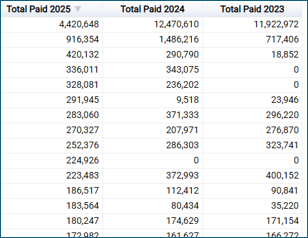
Track Spend. Control Budgets. Improve Oversight.
The Works Orders reports provide a detailed breakdown of expenditure across your organisation, giving you a clear view of where budgets are being used—and where closer attention may be needed. With data available by site, building, and financial year, these reports help you monitor spend in real time, identify cost trends, and spot potential overspend before it becomes an issue.
Whether you're reviewing annual budgets or day-to-day financial activity, the Works Orders reports ensure you're always equipped with the insight needed to make confident, informed financial decisions.
With clear visibility of spend by site, building, and financial year, the Works Orders reports help you stay on top of budgets and make informed financial decisions. By highlighting patterns in expenditure, they enable you to track progress against targets, identify areas of overspend, and take early action where needed.
This level of oversight supports better financial planning, improved accountability, and stronger cost control across your estate.

